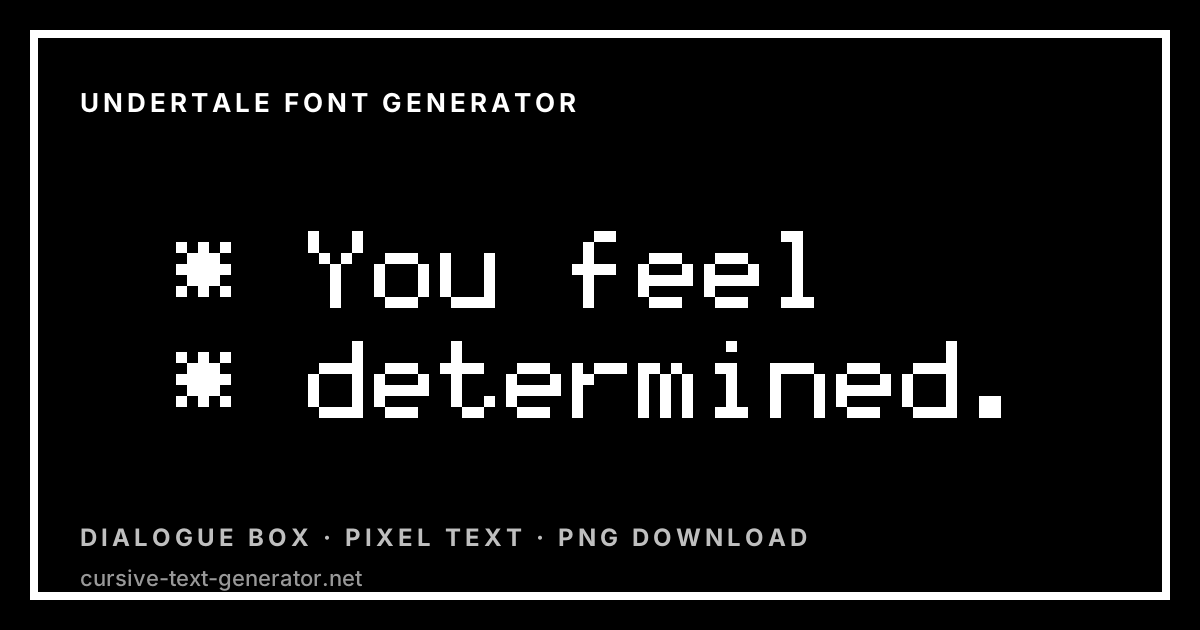
White pixel text in a black dialogue box
Undertale Font Generator
Write a line and see it drawn the way an RPG dialogue box would show it: white pixel letters, a hard black field and a thin white border. Adjust the pixel size, recolour the text for a specific character, and download a PNG. It all renders in your browser, with no font to install.
Free · no sign-up · renders in your browser · nothing is uploaded
What the Undertale Font Generator Does
The look this page reproduces is a text box, not a typeface on its own. Three things create it: a plain monospaced-feeling pixel alphabet with no outline or shadow, pure white on pure black so the contrast is absolute, and a one-pixel white rule drawn just inside the edge of the frame. Take away the border and you have plain pixel text; add it back and the same words read as a line of game dialogue.
Because the renderer draws each letter from a bitmap grid rather than substituting lookalike characters, you get controls a copy-and-paste tool cannot offer. The pixel size slider takes the text from a fine grid up to heavy blocks. The colour pickers recolour every style at once, which is how you get the character-coloured variants people usually want — a red line, a cyan line, an orange line. The Battle Box preset thickens the border and widens the padding for the squarer frame used in combat scenes.
The dialogue styles are the only ones on the site that use left alignment rather than centring, because a text box reads as a text box only when the lines start flush at the left edge. Press Enter in the input to add a second or third line and it will wrap the way a real box does.
How to Use the Undertale Font Generator
- 1. Write your lineType the text you want in the box. Press Enter to start a second line — the dialogue styles keep the lines left-aligned, as a real text box does.
- 2. Choose a styleDialogue Box and Battle Box add the white border. Determination is the same text with no frame, and the coloured presets stand in for different speakers.
- 3. Adjust size and colourUse the pixel size slider for finer or chunkier letters. Tick Custom colours to set an exact text colour for a specific character.
- 4. Save or copyDownload PNG saves the frame exactly as shown. Copy text art copies the same letters as block characters for chat.
Dialogue and Battle Styles on This Page
All twelve presets draw the same bitmap alphabet. What changes is the frame, the colour and how much glow sits behind the letters.
- Dialogue Box — White text, black field, a thin white border and generous padding. Left-aligned, and the closest match to a standard RPG text box.
- Determination — The same white-on-black text with no border, for when you want the line without the frame.
- Battle Box — A thicker two-pixel border and wider padding, in all caps — the squarer frame used for combat text.
- Red Soul — Red letters with a soft red halo on black.
- Golden Flower — A warm gold gradient on near-black.
- Bone Blue — Pale cyan letters with a blue glow.
- Orange Attack — Amber letters with a warm glow, the counterpart to the blue.
- Glitched — White letters with red and cyan copies offset one pixel either side, for a corrupted-signal look.
- Terminal — Bright green on pure black, plainer and more computer-like.
- CRT Monitor — Pale green with scanlines drawn over the whole image.
- Midnight Pixel — Cyan letters with a dark outline on deep navy — the least game-specific of the dark styles.
- Transparent PNG — No background at all, for compositing the text onto your own artwork.
Copy, Download and What Actually Transfers
Download PNG saves the canvas exactly as drawn, border included, at whatever pixel size you selected. This is what you want for fan art, a video thumbnail, a Discord embed image or a printed sticker sheet.
Copy text art is the output that survives the clipboard: your line rebuilt from solid block characters, one per pixel, which pastes into Discord or a README as real text. Put it inside a code block so the rows stay aligned — in a proportional font the shape falls apart. Keep the line short, since every letter is five characters wide.
For a username or a bio you need real characters, and there is no pixel alphabet in Unicode to map onto. The closest usable options are the monospace and full-width Unicode styles in the fancy text generator, which read as blocky without being pixel art.
Good to know: the bitmap alphabet covers A–Z, a–z, 0–9 and common punctuation, including the asterisk that dialogue lines usually open with. Emoji, accented letters and non-Latin scripts have no bitmap and render as blank space.
Making a Dialogue Box That Reads Correctly
A convincing text box is mostly about line breaks. Real dialogue boxes are narrow and break early — usually somewhere between thirty and forty characters — and they keep a consistent left margin, which is why the dialogue presets here do not centre their text. Type your own line breaks rather than letting one long line run: press Enter where the box would break, and the frame will size itself around the block you built.
Lines in this style also conventionally open with an asterisk and a space, and that character is in the alphabet, so “* You feel determined.” renders exactly as typed. Sentence case reads better than all caps for narration; save the all-caps treatment for the Battle Box preset, where it belongs.
Character-coloured text is the other thing people come here for, and Custom colours is how you get it: pick the exact hex value you want and it replaces the text colour on every preset while leaving the frame white. A useful trick is to draft in Dialogue Box at a small pixel size to get the line breaks right, then raise the pixel size and switch presets once the wording is settled — the layout will not shift, because the pixel grid scales uniformly.
Where People Use Pixel Dialogue Text
The usual homes are fan art and comics, video thumbnails and stream overlays, Discord server rules and announcement images, meme captions built around a text box, and mock-ups for people making their own RPGs who need placeholder dialogue that looks right. The transparent export is popular for sticker sheets and for compositing a line over a screenshot.
The block art output travels differently. Pasted into a Discord code block it becomes a text banner nobody can scroll past, and it works in READMEs, terminal splash screens and anywhere images are stripped out. It is the only output here that stays text all the way through.
Undertale Font Examples to Try
Paste any of these in to see how the presets handle punctuation, multiple lines and short labels.
* You feel determined.Standard narration line* But nobody came.Short single line* Howdy!
* I'm new here.Two lines — press EnterFIGHT ACT ITEM MERCYMenu row, all caps* 99 / 99 HPNumbers and punctuationSAVEOne word, very largeIs This the Real Undertale Font?
No. The fonts used in Undertale are Determination Mono and Determination Sans, fan-made typefaces created after the game’s release, plus separate faces for individual characters. They are distributed by their own authors under their own terms, and this page neither hosts them nor loads them, so what you see here is a lookalike rather than the article itself. If you need those exact files for a project, get them from their creators and read the licence.
Nothing on this page is a copy of a commercial or fan-made game font. The letters you see are an original 5×8 bitmap alphabet drawn for this site, painted with colours, outlines and drop shadows chosen to evoke the era rather than to reproduce any studio’s artwork. No font file is downloaded to your device, and none is redistributed from ours.
That distinction matters if you plan to publish what you make. A PNG of your own words in a generic pixel alphabet is yours to use. A game’s actual logo, wordmark, character art or trademarked name is not, and running those words through a pixel generator does not change that. Fan art, personal profiles, private servers and mock-ups are the normal home for this kind of image; merchandise, thumbnails monetised off a franchise, and anything implying an official connection are where rights holders object.
Related Generators
Undertale Font Generator FAQ
What font does Undertale use?
The main text is set in Determination Mono and Determination Sans, fan-made typefaces released after the game, with separate faces for certain characters. They are not distributed here — this page draws its own pixel alphabet in the same spirit.
Can I copy and paste Undertale text?
The PNG is an image and cannot be pasted into a bio or username. Copy text art rebuilds the same letters from block characters, which does paste as real text — use a code block so the rows line up.
How do I make an Undertale dialogue box?
Pick the Dialogue Box style, type your line, and press Enter where you want the box to break. The white border and left alignment come with the preset; raise the pixel size before downloading if you need a bigger image.
Can I change the text colour for a character?
Yes. Tick “Custom colours” and choose the exact colour you want. It replaces the text colour on every preset while the dialogue frame stays white.
Can I get a transparent PNG?
Yes. Tick “Transparent background” and the image exports with a clean alpha channel, which is what you want when compositing over a screenshot or your own art.
Does the asterisk at the start of a line work?
It does. The asterisk, along with A–Z, a–z, 0–9 and common punctuation, is part of the bitmap alphabet, so a line typed as “* You feel determined.” renders exactly as written.
Can I use these images in my fan art or video?
The alphabet is original, so an image of your own words is yours to use. Franchise names, characters and logos remain the rights holder’s, which is the usual line between fan work and commercial use.
Is the Undertale font generator free?
Yes. It runs in your browser, needs no sign-up, adds no watermark and has no limit.